Blueprint Reference
A reference for the main blueprints you'll touch as a designer — what each one is, its most important instance-editable properties, and the functions worth knowing. It deliberately skips internal helpers; for why the pieces fit together see How It Works.
This page covers the headline properties. In-editor, hover any variable for its full description and tuning guidance — the tooltips are the exhaustive reference.
Navigation
BP_DroneNavManager
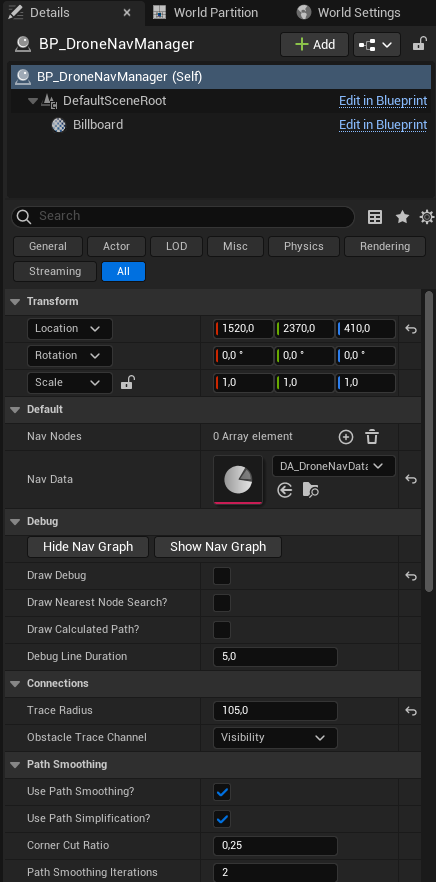
Actor — place exactly one per level. Owns the navigation graph and answers path queries.
Key Properties
| Property | Type | Description |
|---|---|---|
| TraceRadius | Float (105) | Clearance an edge needs to be valid = drone radius + ~30 corner margin. Keep equal to the volume's NodeClearanceRadius. |
| ObstacleTraceChannel | Trace Channel (Visibility) | The channel used for all clearance/LOS traces. The drone must be transparent to it — see Collision Setup. |
| UsePathSimplification? / UsePathSmoothing? | Boolean | Post-process the raw A* path (string-pull + corner-cut). On by default. |
| DrawCalculatedPath? | Boolean | Runtime: draw every computed path (yellow line, green start, red goal). See Debugging. |
| DrawNearestNodeSearch? | Boolean | Visualise the start/goal node snap — useful for edge-of-volume "Path Not Found". |
| DrawDebug | Boolean | Draw node locations at runtime. Off for shipping. |
Key Functions
| Function | When | Description |
|---|---|---|
| Bake Navigation | Editor button | Builds the graph from your volumes and writes it into the data asset. Run after any geometry/volume/clearance change. |
| Show / Hide Nav Graph | Editor button | Draws the baked graph in the viewport (green = connected, red = isolated, blue = links). |
FindPath | Runtime | The A* query. Called for you by the follower — you won't call it directly. |
Connection distance lives on the volumes, not here. The manager no longer has a global
MaxConnectionDistance— each volume derives its own fromGridSpacing(see below), and the manager links each node at its source volume's reach. So dense and sparse volumes mix in one graph.
BP_DroneNavVolume
Actor — place one or many. Defines a region of airspace and fills it with candidate nodes at bake time.
Key Properties
| Property | Type | Description |
|---|---|---|
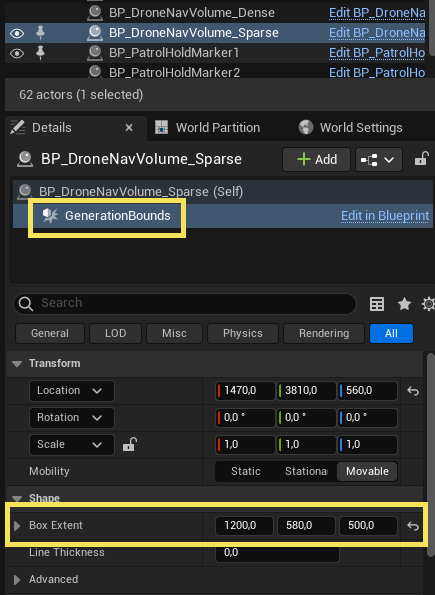
| GenerationBounds | Box Component (root) | The sampled region. Resize it with the Box Extent; place/rotate the actor to position it. It's the actor's root, so the box can't be moved out of alignment with the actor. |
| GridSpacing | Float (200) | Distance between candidate nodes — the density knob. Smaller = denser graph (better routes, slower bake). |
| ConnectionDistanceRatio | Float (1.9) | Multiplier from GridSpacing to the linking distance. Clamped to ≥ 1.732 (the √3 floor), so the graph can't fragment. Rarely changed. |
| MaxConnectionDistance | Float (derived, read-only) | GridSpacing × max(ConnectionDistanceRatio, 1.732) × actor scale. Computed in the Construction Script — don't edit it; it updates live as you change GridSpacing. |
| NodeClearanceRadius | Float (105) | Empty space a node needs to survive. Match the manager's TraceRadius. |
| MaxGeneratedNodes | Int (500) | Safety cap on nodes per volume. |
| ShowFitPreview? / AgentRadius | Bool / Float | Editor preview of where the agent fits inside the volume. |
| DrawDebug / DrawDebugDuration | Bool / Float | Draw generated node positions. |
Volumes never run on their own — the manager samples them during Bake Navigation. Place big sparse volumes (large
GridSpacing) over open areas, smaller denser ones near complex geometry; they can overlap/abut and the graph stitches across them. Tuning is inline on the volume — there's no separate config asset. See Tuning.
Movement
BP_DronePathFollowerComponent
Actor Component — the reusable movement engine. Lives on BP_AIDrone; attach to any pawn to make it fly paths.
Key Properties
| Property | Type | Description |
|---|---|---|
| MoveSpeedChase | Float (450) | Cruise speed while pursuing a target. |
| MoveSpeedPatrol | Float (250) | Cruise speed while patrolling. |
| MaxAcceleration | Float (500) | How fast velocity can change. Lower = heavier/more inertial; higher = snappier. The only corner-rounding in the pipeline. |
| AcceptanceRadius | Float (100) | How close counts as "arrived." Set ≈ the drone's body bounds — too small and it wedges in gaps narrower than itself. |
| MaxSearchDistance | Float (2000) | How far the start/goal may be from the graph before a query fails. |
| UseLocalAvoidance? | Boolean | Reactive steering around obstacles between waypoints. |
| AvoidanceProbeDistance / AvoidanceProbeRadius | Float (200 / 80) | The forward probe that detects obstacles. Lower the distance for thin obstacles so it doesn't over-react. |
| AvoidanceStrength | Float (0.3) | 0 = ignore obstacles, 1 = steer fully sideways, ~0.5 = arc around. |
Key Functions & Events
| Member | Kind | Description |
|---|---|---|
RequestPathToLocation | Function | Asks the manager for a path and starts following it. Driven by the brain via the interface — not called directly. |
FollowWaypoints | Function | Follows an exact waypoint list without pathfinding (used by patrol). |
| OnPathCompleted | Event (dispatcher) | Fires on arrival. The pawn relays it as OnReachedDestination (the patrol heartbeat). |
Drone pawn & brain
BP_AIDrone
Pawn — the drone body. Implements BPI_ControllableDrone; owns movement, facing, visual banking, and rotor audio.
BP_AIDrone is the mesh-agnostic base. Two concrete drones ship on top of it — BP_AIDrone_Aurora and BP_AIDrone_AI41 — and each is only the base plus a mesh; no logic of their own. Drop either straight into a level.
For your own model, make a Blueprint child of BP_AIDrone and assign a SkeletalMesh or StaticMesh under BodyMount. Everything below is inherited, including the camera, so a custom drone is a one-property job.
Key Properties
| Property | Type | Description |
|---|---|---|
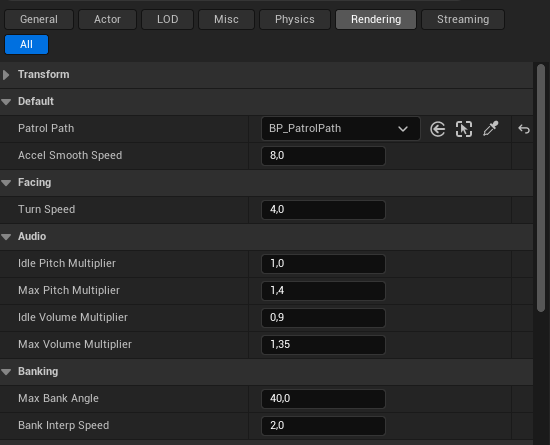
| PatrolPath | BP_PatrolPath ref | The one you'll set most. Assign a patrol path and the drone patrols it when no target is in sight. Leave empty for chase-only. |
| TurnSpeed | Float | How quickly the drone rotates toward its facing target (≈4–6). Never 0 (= instant snap). |
| MaxBankAngle | Float (40) | Max visual roll/pitch lean into acceleration. |
| BankInterpSpeed | Float (2.0) | How smoothly the body eases into a bank. |
| AccelSmoothSpeed | Float (8) | Low-pass on the acceleration estimate that drives banking — higher = snappier, lower = smoother (anti-wobble knob). |
| Idle/Max Pitch & Volume Multipliers | Float | Rotor-audio pitch + volume at hover vs top speed; the hum lerps between them by current speed. |
Components & Events
- Hierarchy:
SphereCollision(root) →BodyMount(the banking pivot) → mesh +RotorAudio; plusSpringArm→Cameraon the root, which powers the drone-view toggle for this drone and every subclass. OnReachedDestination— event dispatcher the brain (patrol) listens to; relayed from the follower'sOnPathCompleted.
The root SphereCollision already ignores the nav trace channel (required for pathfinding) — you don't need to set it up for the included drone. Revisit it only if you build a custom pawn or resize the sphere, in which case keep TraceRadius / NodeClearanceRadius matched to it. See Collision Setup.
BP_AIDroneController
AIController — the brain. Senses the target, owns target memory, and runs BT_AIDrone. Commands the pawn only through the interface.
Key Properties
| Property | Type | Description |
|---|---|---|
| FriendlyTag | Name (Team A) | Actors carrying this tag are treated as friendly and never chased. Give your player, allied NPCs, or anything the drone should ignore this tag. |
| CanSpotEnemies? | Boolean (true) | Master detection switch. Set to false and the drone goes blind — it ignores every actor and just patrols. Toggle it at runtime to enable/disable hunting. |
| MemoryDuration | Float | How long a lost target is remembered before giving up and returning to patrol. |
| SearchStartDelay | Float | Grace period after losing sight before it leaves the hover spot to actively investigate. |
| DesiredHoverHeight / DesiredApproachDistance | Float | Where the chase hover spot sits relative to the target (above + offset toward the drone's side). |
| RepathInterval / MoveGoalUpdateThreshold | Float | Re-path throttle — minimum time + goal-movement before requesting a new path (prevents jitter). |
| Scan: ScanYawRange / ScanYawSpeed / ScanLookDistance / ScanArriveRadius | Float | The left-right facing sweep while searching a last-known location. |
| DrawDebug? | Boolean | Controller-side debug draws. |
Who counts as an enemy: an actor is hostile only when it is a
Character(or subclass) and does not carryFriendlyTag. Non-Character actors (props, pickups, other drones) are never targeted, so you don't need to tag the whole level — just tag the Characters you want spared.
The controller runs
BT_AIDrone(a priority selector: Chase → Search → Patrol → Idle) withBB_AIDroneas its blackboard. You normally won't edit the tree; tune behaviour through the properties above. See How It Works.
BPI_ControllableDrone
Interface — the only vocabulary the brain uses to command the body. Implement it to drive a custom drone pawn.
| Message | Description |
|---|---|
| MoveToLocation | Path to a world location (chase/search) via the nav graph. |
| FollowWaypointPath | Follow an exact waypoint list (patrol), bypassing the graph. |
| SetMovementMode | Switch between Patrol / Chase speed modes. |
| SetFocusLocation / ClearFocus | Face a world point / return to facing travel direction. |
| Stop | Halt and clear the current path. |
Combat (optional)
BP_DroneWeaponComponent
Actor Component — the reusable weapon. Add it to a drone to let it shoot; a drone without it never fires. See Combat.
Key Properties
| Property | Type | Description |
|---|---|---|
| Damage | Float (10) | Damage dealt per landed shot, via Unreal's Apply Point Damage. |
| DamageTypeClass | Class (DamageType) | Tags the damage so your health system can branch per type. |
| FiringRange | Float | How close the drone must be to open fire. |
| FireInterval | Float | Seconds between shots (rate of fire). |
| FireAimTolerance | Float | How tightly aimed the body must be before firing (wider = harder to juke out of). |
| MuzzleSocketPrefix | Name | Resolves the gun's muzzle sockets on the mesh at BeginPlay (multi-barrel). |
| WeaponObjectTypes | Array of Object Type | What a shot can hit. Default WorldStatic / WorldDynamic / Pawn — enemies (Pawns/Characters) are hit with no collision setup; world geometry blocks (cover). |
| ProjectileFX | Niagara (NS_projectile) | The projectile/tracer visual spawned per barrel. Multicast to all clients. |
| ProjectileSpeed | Float | Travel speed of the tracer. |
| MuzzleFX / ImpactFX / FireSound | Niagara / Sound | Per-shot effects you assign. |
| DrawDebug? | Boolean | Draw the shot traces. Off for shipping. |
Key Functions & Events
| Member | Kind | Description |
|---|---|---|
| OnHitTarget | Event (dispatcher) | Broadcast on the server each shot that lands: (HitActor, DamageAmount, Hit, HitDirection). Bind it to hook hits into your own systems. |
StartFiring / StopFiring | Function | Begin/stop the firing timer. Driven by the brain — you won't call them directly. |
IsInFiringRange / IsAimedAt | Function | The engage gates (range; body-forward aim). |
Two ways to take damage. On your target, implement
Event AnyDamage/OnTakePointDamage(engine-standard, works with any actor) or bindOnHitTargeton the drone's weapon. Both fire on the server — reduce a replicated health value there.
Patrol authoring
BP_PatrolPath
Actor — a spline route with optional hold markers.
| Property | Type | Description |
|---|---|---|
| Markers | Array of BP_PatrolHoldMarker | Optional pause points; the path snaps each onto the spline. |
| SampleSpacing | Float (25–50) | How finely the spline is sampled into waypoints — the live corner-smoothness lever (smaller = smoother). |
| SnapMarkersInEditor? | Boolean | Re-snaps markers onto the spline in the editor. Keep on. |
| ShowFitPreview? / AgentRadius | Bool / Float | Draws a clearance preview along the spline (green = fits, red = clips). Set AgentRadius to the drone's radius. |
| ShowPathDebug | Boolean | Draw the spline + markers at runtime. |
BP_PatrolHoldMarker
Actor — a point on a patrol path where the drone pauses.
| Property | Type | Description |
|---|---|---|
| HoldDuration | Float (3.0) | Seconds to pause (0 = fly through). |
| UseLookDirection? | Boolean | While paused, face the marker's own facing — rotate the marker actor to aim it (the arrow shows the direction). Otherwise the drone keeps facing its travel direction. |
| SplineDistance | Float | Auto-filled by the path's Construction Script — do not hand-edit. |
See Patrol for the authoring workflow.
Editor tools
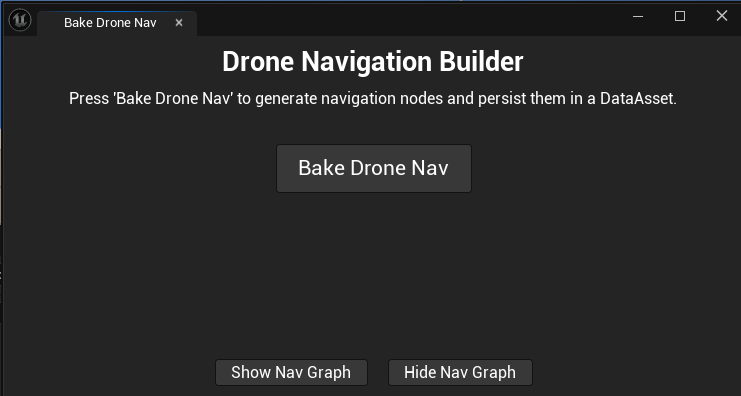
EUW_BakeDroneNav (Editor Utility Widget)
Right-click → Run Editor Utility Widget. Buttons: Bake Navigation and Show / Hide Nav Graph. This is the main authoring surface for the nav graph — see Quick Start.