Combat
The drone can detect an enemy, close in, aim, and open fire — dealing damage you wire into your own health system. Combat is optional: it lives in a single reusable component (BP_DroneWeaponComponent), and a drone without it simply flies and patrols exactly as before.
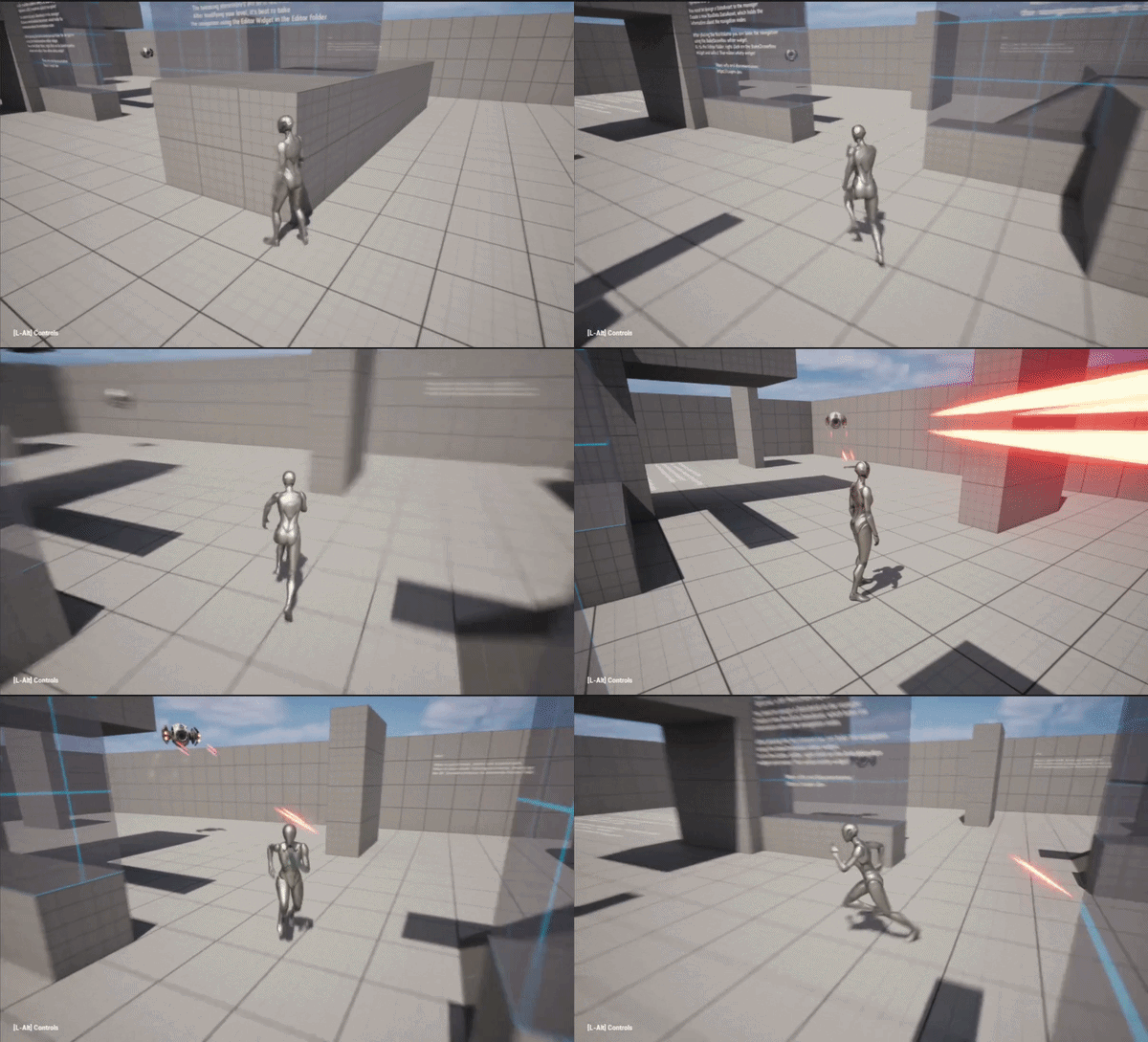
How an engagement plays out
- Detect. The drone spots a hostile target — the same friend/foe rule as the rest of the AI (a
Characterthat doesn't carry theFriendlyTag). See How It Works → Who the drone targets. - Alert. It holds for a brief
DetectionDelay— a moment to react before it commits — then begins the chase. - Close + aim. As it crosses
FiringRangethe body pitches and yaws to point its guns at the target. - Fire. Once the muzzle is within
FireAimToleranceit opens fire — while still closing in — and keeps firing from its hover spot.
The engagement breaks (and firing stops) on any of three things, which are the player's three counters:
- Outrun it — leave
FiringRange. - Break line of sight — duck behind cover.
- Out-juke the turn — strafe faster than the drone can swing its guns (
TurnSpeed).
Aiming — fixed guns that converge
The guns are bolted to the body, so the drone rotates the whole body to aim (pitch clamped by MaxAimPitch so it never points comically straight up or down). On a multi-barrel model the side barrels converge on the target — they meet where the body is pointing, so a well-aimed drone lands both beams on the target and a mis-aimed one sends them wide. This keeps "am I aimed?" honest: the aim gate and the actual beams use the same body-forward direction.
What the shots hit
Shots are an object trace against WeaponObjectTypes (by default WorldStatic, WorldDynamic, and Pawn):
- Enemies are hit automatically. Characters and Pawns are the
Pawnobject type, so they register hits with no per-target collision setup. - Walls block shots.
WorldStatic/WorldDynamicgeometry stops a beam, so cover works.
A line trace on the Visibility channel passes straight through Characters — the standard Pawn collision profile ignores Visibility (so the camera doesn't collide with players). Tracing by object type sidesteps that, so your enemies are shootable out of the box. To make something un-shootable, keep it off those object types (or remove the type from WeaponObjectTypes). See Collision Setup.
The component also exposes a WeaponTraceChannel property: it is deprecated, has no effect, and will be removed in a future update.
Dealing damage — hook into your own health system
Each shot that lands carries a Damage value (how hard this drone hits). When a shot connects with the target, the drone does two things on the server:
- Calls Unreal's standard
Apply Point Damageon the target. - Broadcasts its own
OnHitTargetevent.
You can receive the hit either way — pick whichever fits your project:
A. Engine damage events (most reusable). On your target actor, implement Event AnyDamage (or Event OnTakePointDamage if you want the hit location/direction) and subtract from your own health. This works with any actor and couples to nothing in this pack:
Your enemy actor:
  Event AnyDamage (Damage) ──► Health = Health − Damage ──► (Health <= 0?) Die
B. The OnHitTarget dispatcher. Bind it on the drone's DroneWeapon component for fully custom handling — score, hit markers, your own damage routine:
OnHitTarget (HitActor, DamageAmount, Hit, HitDirection) ──► your handler
Use DamageTypeClass to tag the damage (e.g. an Explosive/Energy DamageType) so your health system can react differently per type. Damage is applied once per shot, regardless of how many barrels land — so Damage reads as a clean per-shot number.
This pack deals damage; your game owns health. A target with no damage handling simply takes fire harmlessly — nothing breaks.
Multiplayer
Combat is built server-authoritative, which is exactly where health belongs in multiplayer:
- Firing, hit traces, and damage all run on the server.
Apply Point Damagefires your target's damage event on the server — reduce a replicated health value there and it shows on every client, the standard Unreal pattern. - The drone's aim replicates. The aiming pitch and yaw are replicated, so remote clients see the drone tilt and face its target while engaging — not just the host.
- Firing FX replicate. The projectile tracer, muzzle/impact effects, and the fire sound play on every client (the weapon multicasts them) — all players see the drone shooting, not only the host.
Setup checklist
- Put a
BP_DroneWeaponComponenton your drone. (The includedBP_AIDronealready has one.) - Set
Damage, and confirm the gun's muzzle sockets exist on the mesh (named withMuzzleSocketPrefix). - Assign your muzzle / impact / projectile FX and fire sound on the component.
- To take damage, give your enemy actor an
Event AnyDamage(or bindOnHitTarget).
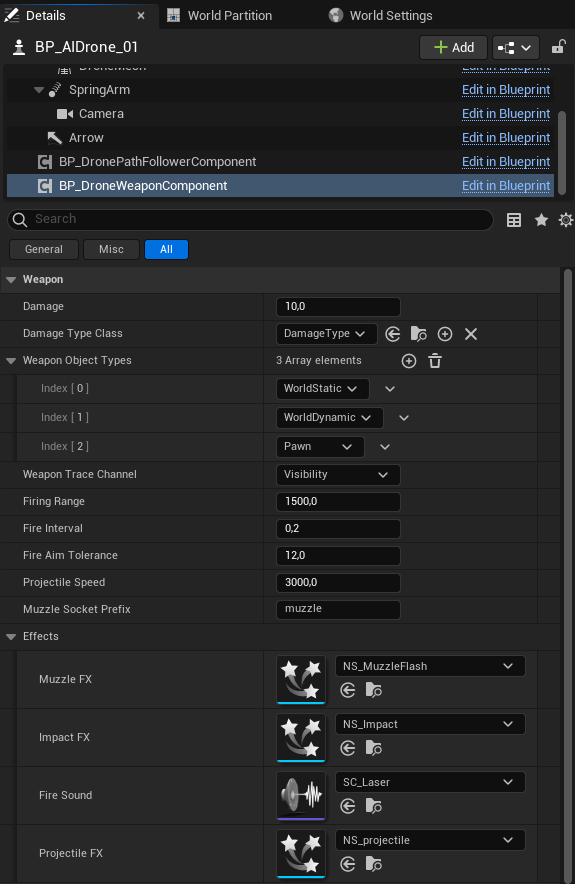
Combat tuning
An engagement is shaped by three Blueprints, so these knobs aren't all in one Details panel — Where tells you which actor to select.
| Property | Where | Default | What it does |
|---|---|---|---|
Damage | BP_DroneWeaponComponent | 10 | Damage dealt per landed shot. |
FiringRange | BP_DroneWeaponComponent | 1500 | How close the drone must be to open fire. |
FireInterval | BP_DroneWeaponComponent | 0.2 | Seconds between shots (rate of fire). |
FireAimTolerance | BP_DroneWeaponComponent | 12 | How tightly the body must be aimed before it fires, in degrees (wider = harder for the target to juke out). |
MaxAimPitch | BP_AIDrone (the pawn) | 60 | Clamp (degrees) on how far the nose pitches up/down to aim. |
ProjectileSpeed | BP_DroneWeaponComponent | 3000 | Travel speed of the cosmetic projectile tracer (the beam visual). |
DetectionDelay | BP_AIDroneController | 1.0 | The Alert pause between spotting a target and committing to the chase. |
WeaponObjectTypes | BP_DroneWeaponComponent | WorldStatic, WorldDynamic, Pawn | Object types a shot can hit (what's shootable, what blocks). |
Full property lists are in the Blueprint Reference, one section per Blueprint above: BP_DroneWeaponComponent, BP_AIDrone and BP_AIDroneController.